

Clean, well-structured divs are no longer just a front-end hygiene issue; they are a core AEO asset that determines how reliably LLMs and AI crawlers can understand, summarize, and cite your content. Treating your divs as a structural layer—rather than random wrappers—gives AI systems a clearer map of what your page is about and which parts matter most.
What divs are and how sites actually use them
A <div> is a generic block-level HTML container used to group elements for layout, styling, or scripting when no more specific semantic element applies. In modern component-based development, divs are everywhere: they define grids, cards, sidebars, hero blocks, and UI shells that frameworks like React, Vue, and design systems rely on.
Used intentionally and combined with semantic HTML (<header>, <main>, <section>, <article>, <footer>, etc.), divs help create clean component boundaries while still exposing a predictable document structure that both browsers and crawlers can interpret. The problem is not the div itself—it is what happens when divs become the only building block.
How divs get messy and stack up over time
Any site with real-world history tends to accumulate “div soup.” New features are wrapped in extra containers, legacy layout systems stick around, and developers copy-paste old components rather than refactoring. Over years of sprints you end up with:
- Deeply nested wrapper chains around every meaningful block of content
- Anonymous or meaningless containers (
<div><div><div>...) that exist only to fix spacing or layout quirks - Abandoned or duplicated structures from experiments, campaigns, and redesigns
The result is a bloated DOM where the actual article, product description, or answer is buried under layers of wrappers. Humans see a clean page; the DOM tree tells a very different story.
Why messy divs are bad for LLMs and AI visibility
LLMs and AI crawlers ultimately “see” the rendered DOM and its structure, not just the pixels on screen. As more AI systems rely on HTML snapshots, DOM trees, and layout heuristics to decide what is the main content versus boilerplate, your div strategy becomes an AEO signal.
Messy div usage can limit a website’s visibility in LLMs and AI in several ways, below are a few of the most common:
- Higher structural noise: When every part of the page is wrapped in deeply nested, generic containers, models have to sift through a lot of non-semantic nodes to isolate the main content block. This extra noise makes it less reliable for models to pick out the canonical answer area or article body.
- Weaker semantic cues: If everything is a div, AI has fewer strong signals to distinguish navigation, footers, sidebars, disclaimers, and related links from the content you want surfaced as an answer. Semantic elements and clean hierarchy help models create “chunks” that map to topics and entities.
- Misinterpreted layouts: Key text buried in sliders, complex cards, or off-canvas panels built from div chains can be treated as peripheral. Conversely, repetitive layout structures can be misread as multiple separate pieces of content, which can distort summarization and entity extraction.
- Brittle extraction: Answer engines and LLM pipelines that rely on main-content extraction and boilerplate removal have a harder job when everything looks structurally similar. Small template changes can suddenly move or fragment the “main” content, creating unstable AI outputs over time.
Clean, intentional div usage sharpens the signal-to-noise ratio. It makes it easier for AI to (a) locate the main content, (b) understand its sections, and (c) reliably reproduce your narrative as a coherent answer instead of a messy collage.
How to check whether your divs are messy
You can treat “div hygiene” as a diagnosable, repeatable part of your AEO technical audit. A practical workflow:
- Inspect the DOM tree in DevTools
- Open your browser’s developer tools, go to the Elements/Inspector panel, and expand
<body>. - Follow the path into your main article or product content and count how many levels of wrappers you traverse before reaching actual text nodes or semantic elements.
- If you see 8–10+ levels of
<div>before any meaningful content, that’s a strong indicator of div soup.
- Open your browser’s developer tools, go to the Elements/Inspector panel, and expand
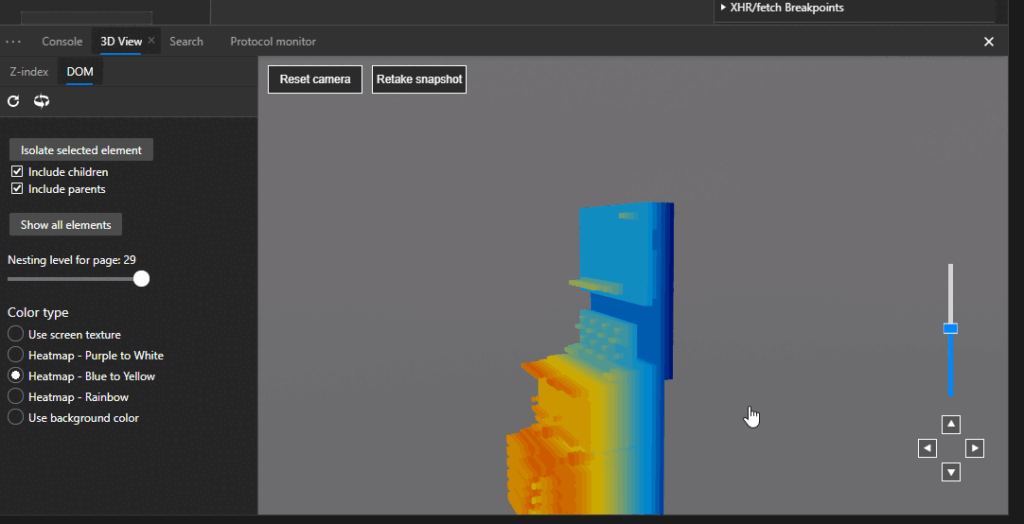
- Use 3D/visual DOM views to spot “towers”
- Use a 3D DOM view (like in Microsoft Edge or via extensions) to see your page as stacked layers.
- Rotate the view and look for tall, narrow “towers” of nodes: those often indicate over-nested wrappers around a single visual region.
- Compare a clean template (e.g., a simple article page) to a complex one; the difference in stack depth is usually obvious.
- Compare template types
- Look at a content-heavy page (blog, docs, product detail) versus a thin utility page.
- If both have similar DOM depth and wrapper complexity, your layout system is likely over-wrapping everything by default.
- Check DOM size and node counts
- Many DevTools will show total DOM node count; pages with tens of thousands of nodes are often suffering from layout bloat and repeated structures.
- If you see large numbers of anonymous or single-child wrappers, you have low-hanging fruit for refactoring.
Other div-related issues that trip up LLMs
Beyond sheer volume, several patterns directly affect how LLMs and AI agents interpret your pages:
- Key content outside
<main>/<article>
If your primary text lives inside arbitrary divs rather than<main>or<article>, it is less obvious which part of the page is “the thing to read.” Clear main-content containers give AI a stable anchor for extraction. - Important text hidden in interactive shells
Content that only appears when complex carousels, accordions, or tabs (built from layered divs) are expanded can be harder to capture in HTML snapshots, especially when it depends on heavy client-side rendering or non-standard patterns. - Divs pretending to be controls
Using bare divs for buttons, links, or inputs—without appropriate ARIA roles or attributes—degrades accessibility and confuses AI agents that model user interactions. Both accessibility APIs and AI navigators benefit when controls are semantic or properly annotated. - Inconsistent component patterns
The same conceptual component (e.g., “article card”) represented by multiple different DOM shapes and class patterns makes it harder for AI systems and heuristics to generalize. Consistent structures and naming help crawlers recognize templates and focus on the changing, meaningful content.
Practical tools to inspect DOM structure and 3D layout
Here are five concrete tools/entry points you can use in audits and demos:
- Microsoft Edge DevTools – 3D View
Built-in 3D visualization of the DOM, z-index, and layers that lets you see the page as stacked elements and quickly spot areas with excessive nesting. - Microsoft Edge DevTools documentation
The official DevTools docs (Elements, Issues, and related panels) walk through how to inspect the DOM tree, layout, accessibility, and performance in a structured way. - DevTools Tips: “See the page in 3D” (Edge)
A concise guide that shows how to enable and use the 3D view to debug layout and DOM depth, useful for before/after screenshots in audits. - DOM Visualizer (web-based)
A simple in-browser DOM tree visualizer that can help you explore node relationships and nesting without setting up a full dev environment. - dom3d (Chrome extension)
A 3D DOM visualization extension that brings similar capabilities to Chrome, letting you inspect depth, stacking, and structural complexity of your pages.
These tools are ideal to make the invisible visible for stakeholders: they turn abstract “div bloat” complaints into obvious, visual patterns that correlate with AI crawlability and answer quality.
Cleanup checklist by level of importance
Use this table as a practical AEO- and LLM-focused checklist. It’s structured so you can triage from “must fix” to “nice to have.”
Div and structure cleanup priorities
| Priority | What to clean up | Why it matters for LLMs and AEO |
|---|---|---|
| Critical | Ensure there is one clear <main> region that contains the primary content, not fragmented across many wrapper divs. | Gives models a stable, obvious anchor for main-content extraction and summarization, reducing confusion with nav and sidebars. |
| Critical | Replace generic divs with semantic elements (<header>, <nav>, <section>, <article>, <footer>) where appropriate. | Strengthens structural cues so AI can separate navigation, content, and boilerplate, improving topic and entity understanding. |
| Critical | Reduce extreme nesting depth around the main content (e.g., more than 8–10 wrapper levels). | Lowers structural noise and makes the main text block easier to isolate in DOM-based extraction pipelines. |
| High | Remove unused or redundant wrappers left by old layout systems, experiments, or “quick fixes.” | Shrinks DOM size, reduces complexity, and decreases the chance that AI systems latch onto the wrong container as “main.” |
| High | Align heading hierarchy (H1–H3) with the visual and logical structure, not randomly scattered div chains. | Helps models segment the page into coherent sections and subtopics, improving answer granularity and snippet targeting. |
| High | Avoid hiding essential copy inside highly nested carousels, sliders, or accordions unless truly necessary. | Ensures key content is more reliably captured in HTML/DOM snapshots and not treated as secondary or ignorable UI content. |
| Medium | Standardize component structures and class naming for recurring blocks (e.g., cards, teasers, promos). | Makes it easier for crawlers and AI to recognize templates and focus on the variable content instead of re-parsing layouts. |
| Medium | Replace div-based buttons and controls with native elements or add correct ARIA roles and attributes. | Improves accessibility and helps AI agents understand what actions are possible and how users interact with the page. |
| Medium | Remove purely presentational wrappers when CSS features (flex, grid, gap, pseudo-elements) can handle layout. | Prevents layout concerns from inflating the DOM hierarchy and keeps the structure focused on meaningful content. |
| Nice-to-have | Incorporate 3D DOM checks (Edge 3D View, dom3d) into QA and code review for key templates. | Creates an ongoing feedback loop that catches structural debt early and preserves AI-friendliness release after release. |
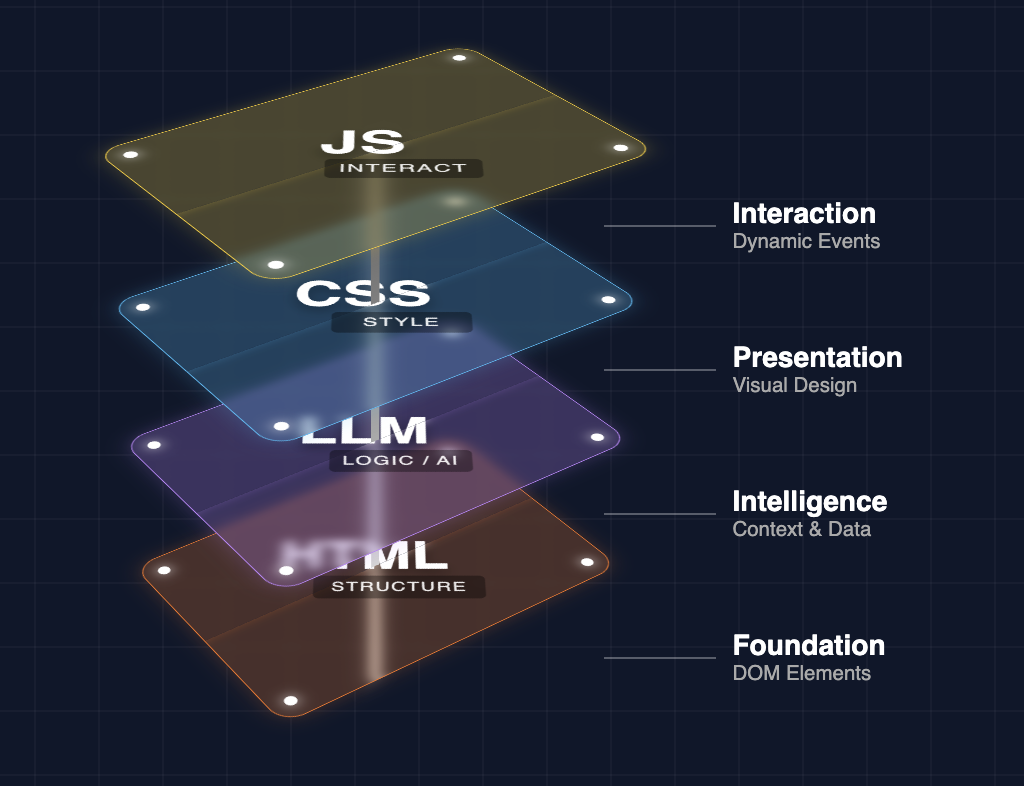
If you frame div cleanup as “AI-facing information architecture” rather than just front-end refactoring, it becomes an obvious part of your AEO program: every layer of structural clarity you add makes it easier for LLMs and answer engines to see, trust, and reuse your best content.









Leave a Reply