

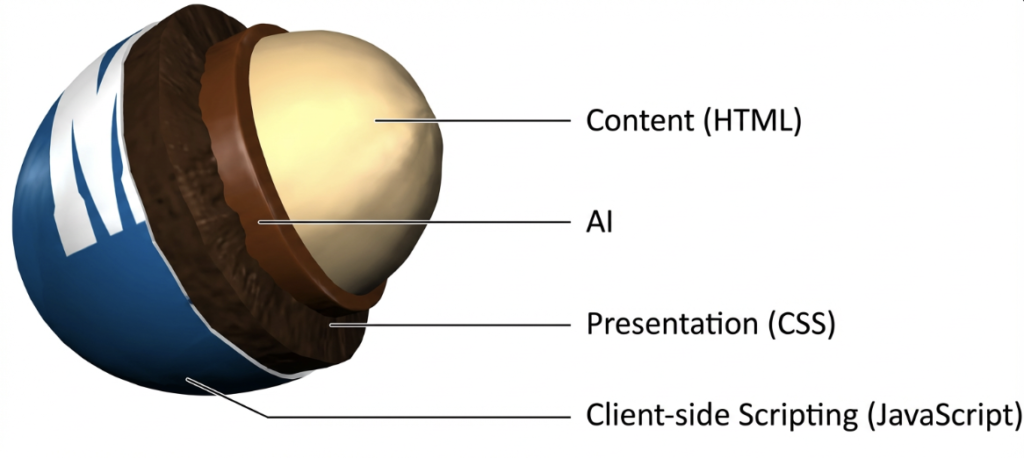
Progressive enhancement and graceful (natural) degradation were born in the early web to handle messy browsers and unreliable connections. In an AI‑search era, they quietly become the backbone for building sites that are both deeply human‑centric and highly legible to LLMs. This article reframes those classic ideas for a world where your pages feed not just search engines, but AI answer engines, copilots, and agents.
Progressive Enhancement: Start from the Core
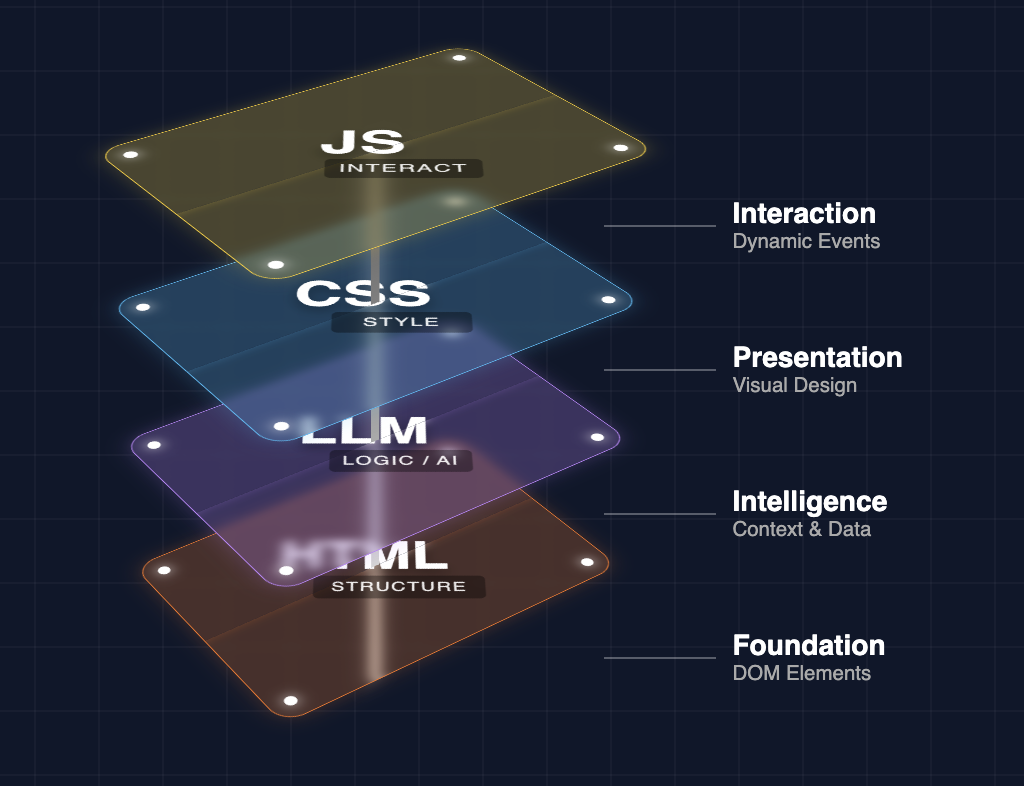
Progressive enhancement is a design and development strategy that starts with a solid, universally accessible core, then layers on more advanced capabilities as conditions allow. The foundation is clean, semantic HTML that delivers content and primary functionality to every user, regardless of browser, device, or connection. On top of that, you add CSS for layout and design, then JavaScript and richer APIs for interactivity and advanced features.
The key rule is simple: the core experience must never depend on optional layers. If styles fail to load or scripts time out, your site still exposes its essential information and tasks. That mindset was originally about human resilience—“it should work on an old phone on a slow connection”—but it now maps directly onto how AI systems crawl and interpret the web.
Natural / Graceful Degradation: Fail Softly, Not Suddenly
Natural or graceful degradation approaches the same problem from the opposite direction: you design the full, modern, feature‑rich experience first, then ensure that if anything breaks or runs on older tech, the system degrades in a controlled way. Instead of a hard crash or a blank screen, users see a simpler, reduced interface that still lets them read content and complete critical flows.
In practice, graceful degradation means your core content is not locked behind fragile client‑side rendering. If a user’s browser blocks JavaScript, if features are partially supported, or if network conditions are poor, your layout and content still show up in usable form. In the AI era, think of this as designing for partial rendering and partial understanding: if an AI can’t execute all your scripts or hydrate all components, it still gets a coherent, text‑first narrative.
Why These Patterns Faded (and Why They’re Back)
Progressive enhancement and graceful degradation rose to prominence in the late 1990s and 2000s, when browser differences were painful and accessibility advocates pushed the industry toward standards and resilient design. They were championed by government, news, and large public sites that needed to serve everyone, not just users on the latest hardware.
As the web moved into a JavaScript‑heavy era—single‑page applications, thick client frameworks, evergreen browsers—many teams implicitly assumed “everyone has modern capabilities” and stopped thinking in layers. Content shifted from HTML to client-rendered views. Whole experiences lived behind API calls and component trees. Progressive enhancement never stopped being good practice, but it slipped to the margins of mainstream front‑end culture.
Now AI brings these patterns back. Models and AI crawlers behave much more like constrained, partial browsers than like full, patient users. They have timeouts, limited JavaScript execution, token budgets, and a strong preference for clean, structured text. The more your site assumes a fully hydrated, modern, JavaScript‑driven environment, the more fragile it becomes for AI consumption.
Why the AI Era Makes Progressive Enhancement Essential
AI answer engines and LLM‑enhanced search don’t “experience” your website the way a human with a modern browser does. They extract, compress, and remix text and structure. That aligns almost perfectly with a progressive enhancement worldview.
Some concrete ways this plays out:
- Semantic HTML is now an AI interface. Clean headings, lists, tables, and landmarks give models explicit hints about hierarchy, relationships, and meaning. A content‑first DOM is easier to chunk, embed, and summarize than a DOM full of anonymous divs and client‑side shells.
- Client‑only content is invisible risk. When key text, FAQs, or product details are only present after JavaScript runs and APIs respond, AI crawlers may never see them—or see them only partially. A progressively enhanced site still exposes the essential narrative even if no JS executes.
- Graceful failure mirrors model constraints. If you design so that limited capabilities still yield a coherent story, you’re effectively designing for how AI systems work: they may see only a snapshot of your HTML, a subset of your resources, or a compressed version of your copy, yet they can still reconstruct meaning.
The result: the same choices that made your site robust for humans on bad networks now make it robust for LLMs ingesting your content at scale.
Building AI Search‑Friendly Websites with Progressive Enhancement
To make progressive enhancement practical for AI search, think of your site as a layered stack: human‑facing UI on top of a text‑rich, semantic core that AI can read directly. That translates into specific implementation patterns.
1. Make the HTML the single source of truth
- Ensure your primary narrative—who you are, what you offer, key benefits, FAQs, and definitions—lives in server‑rendered HTML, not solely in client templates or remote JSON.
- Use heading levels (
h1–h3in particular) to express topic hierarchy clearly: one primary page theme, then subtopics, then supporting details. - Represent entities explicitly: names, roles, attributes, dates, locations, and relationships as real text and well‑structured lists or tables, not just in design elements or images.
2. Enhance with JavaScript, don’t depend on it
- Build filters, accordions, tabs, and dynamic components on top of content that already exists in the DOM. The JS reorganizes or reveals information; it doesn’t create it from nowhere.
- For interactive applications, ensure critical explanatory content and defaults exist as HTML. A model should understand what the app does and why it matters, even if no interactions run.
- Avoid burying important copy in client‑side only modals, popovers, or infinite scroll states that don’t exist in the initial markup.
3. Design graceful degradation for AI constraints
- Assume an AI crawler may only see the first screenful of content or the first set of HTML sections. Put high‑signal, summarizing material early, not hidden after long scrolls or behind complex flows.
- If you use advanced components (e.g., heavy client frameworks, personalized dashboards), design fallback static pages or docs that summarize the same concepts in simple text and links.
- Treat each meaningful state or section as URL‑addressable where possible. If something matters for search or AI understanding, make sure there’s a concrete URL with stable content behind it.
By following these patterns, you create a site that works for humans first but is naturally optimized for AI search to parse, embed, and quote accurately.
The New AI Layer: Introducing llms.txt
As models become key consumers of the web, there is growing interest in a new convention: llms.txt at the root of a domain. Conceptually, it plays a role similar to robots.txt and sitemaps but for the AI layer specifically.
What llms.txt is
llms.txt is a simple, text or Markdown‑style file (often placed at /llms.txt) that:
- Describes which parts of your site are most important for AI systems.
- Provides structured pointers to high‑value content such as docs, research, detailed guides, or canonical FAQs.
- Can express preferences, usage guidance, or licensing notes for LLMs and AI agents.
Where robots.txt focuses on crawl permission and sitemaps focus on discoverability, llms.txt focuses on signaling “what’s worth modeling” and “how to treat it.” It becomes a progressive enhancement layer for AI: the site works without it, but with it, models get a curated map.
How llms.txt fits into your stack
Treat llms.txt as a bridge between your human‑oriented architecture and your AI‑oriented content strategy:
- List core sections and patterns: for example, “/guides/”, “/docs/ai/”, “/faq/”, “/blog/answer-engine-optimization/” with brief, structured descriptions of what each section covers.
- Surface canonical explanations: point models to the definitive “What is X?” or “How does Y work?” pages rather than letting them guess among dozens of posts.
- Define inclusion and exclusion: you might emphasize public knowledge resources while de‑emphasizing transactional or ephemeral areas like login walls, shopping carts, or thin tag pages.
In short, llms.txt lets you express, at a sitewide level, the same priorities that progressive enhancement expresses at the page level.
The Role of Markdown Files in the AI Layer
Markdown (.md / .markdown) has quietly become the lingua franca of technical docs, blogs, and many static sites. For AI, Markdown is almost an ideal input format: lightweight, textual, and structured enough to reveal hierarchy and intent.
Markdown as a canonical content layer
If your content workflow starts in Markdown, you already have a “clean view” of your knowledge, separate from any specific front‑end implementation. That’s incredibly useful in an AI‑search context:
- Each Markdown file is a self-contained unit with a clear topic, hierarchy, and supporting details.
- Headings, lists, quotes, and code blocks give explicit cues about relationships and emphasis.
- The same file can be rendered to HTML for humans and ingested into embeddings, knowledge graphs, or fine‑tuning datasets for AI.
Connecting Markdown to AI consumption
You can think of your Markdown corpus as the structured substrate of the AI layer:
- Public docs and guides: feed them directly into RAG pipelines or AI indices, ensuring that what AI systems know mirrors what humans see.
- Internal knowledge: use Markdown (even if not public) as the base for internal AI search tools, again reinforcing the progressive enhancement idea that text comes first.
- llms.txt: reference Markdown-derived sections or collections, so external LLMs know where your “good text” lives and how it’s organized.
Where traditional SEO treated sitemaps and HTML as primary, an AI‑aware strategy elevates Markdown as a parallel, first‑class representation of your knowledge.
Where AI‑Optimized Content Fits in the Stack
AI‑optimized content is the intentional design of narratives, sections, and structures that align with how models answer questions, while still being genuinely useful and readable for humans. It sits on top of your progressively enhanced foundation.
What AI‑optimized content looks like
Instead of keyword stuffing, AI‑optimized content focuses on:
- Question‑centric structure: direct answers near the top; clear subheadings that mirror natural language queries (“What is…”, “How does…”, “When should…”, “Pros and cons of…”).
- Entity‑rich descriptions: explicit naming of people, products, conditions, locations, and features, with unambiguous relationships.
- Contextual clarity: enough surrounding explanation so a model can safely quote or summarize without hallucinating missing steps, caveats, or conditions.
When built on a progressive enhancement base, this content lives in HTML and (often) Markdown, clearly surfaced in your navigation and highlighted in llms.txt.
How it interacts with llms.txt and Markdown
- llms.txt can point AI crawlers to your most AI‑optimized hubs: key guides, explainer pages, and cluster overviews.
- Your Markdown files can store the same high‑quality structure, which powers internal AI tools, documentation search, and external ingestion.
- The live pages then become the human‑facing skin over a content system that is already shaped for machine understanding.
The stack, in order, looks like this:
Semantic content (HTML/Markdown) → Progressive enhancement (CSS/JS layers) → AI‑optimized structuring (questions, entities, clusters) → AI signaling layer (llms.txt, feeds, APIs).
Why This Makes Sites More Human‑Centric and More LLM‑Friendly
At first glance, “optimizing for AI” sounds like building for robots instead of people. Progressive enhancement flips that assumption. By starting from a resilient, text‑first, meaning‑first foundation, you necessarily prioritize human understanding, accessibility, and clarity. The surprise is that these same qualities are exactly what LLMs need.
Human‑centric benefits include:
- Faster perceived performance and better experiences on slow devices and connections.
- Clearer copy and structure that help real people skim, understand, and recall key ideas.
- Improved accessibility for assistive technologies, older browsers, and low‑bandwidth users.
LLM‑centric benefits include:
- Higher signal‑to‑noise in the HTML and Markdown that models consume, leading to cleaner embeddings and more faithful summaries.
- Reduced dependence on fragile, JavaScript‑only states that crawlers might miss or misinterpret.
- A well-defined, explicit AI layer (via llms.txt, feeds, and structured content) that helps answer engines find, understand, and cite your best material.
Ultimately, progressive enhancement in an AI‑search era is not a nostalgic web‑standards idea—it is a strategic content and architecture pattern. It gives humans a better web and gives AI systems a clearer, more trustworthy model of your site. The more intentional your layers—from HTML and Markdown up through llms.txt and AI‑optimized narratives—the more your website becomes a stable, human‑first foundation for the next generation of search.








Leave a Reply